HOW I ACHIEVED PERFECT LIGHTHOUSE SCORES (100 ACROSS THE BOARD)
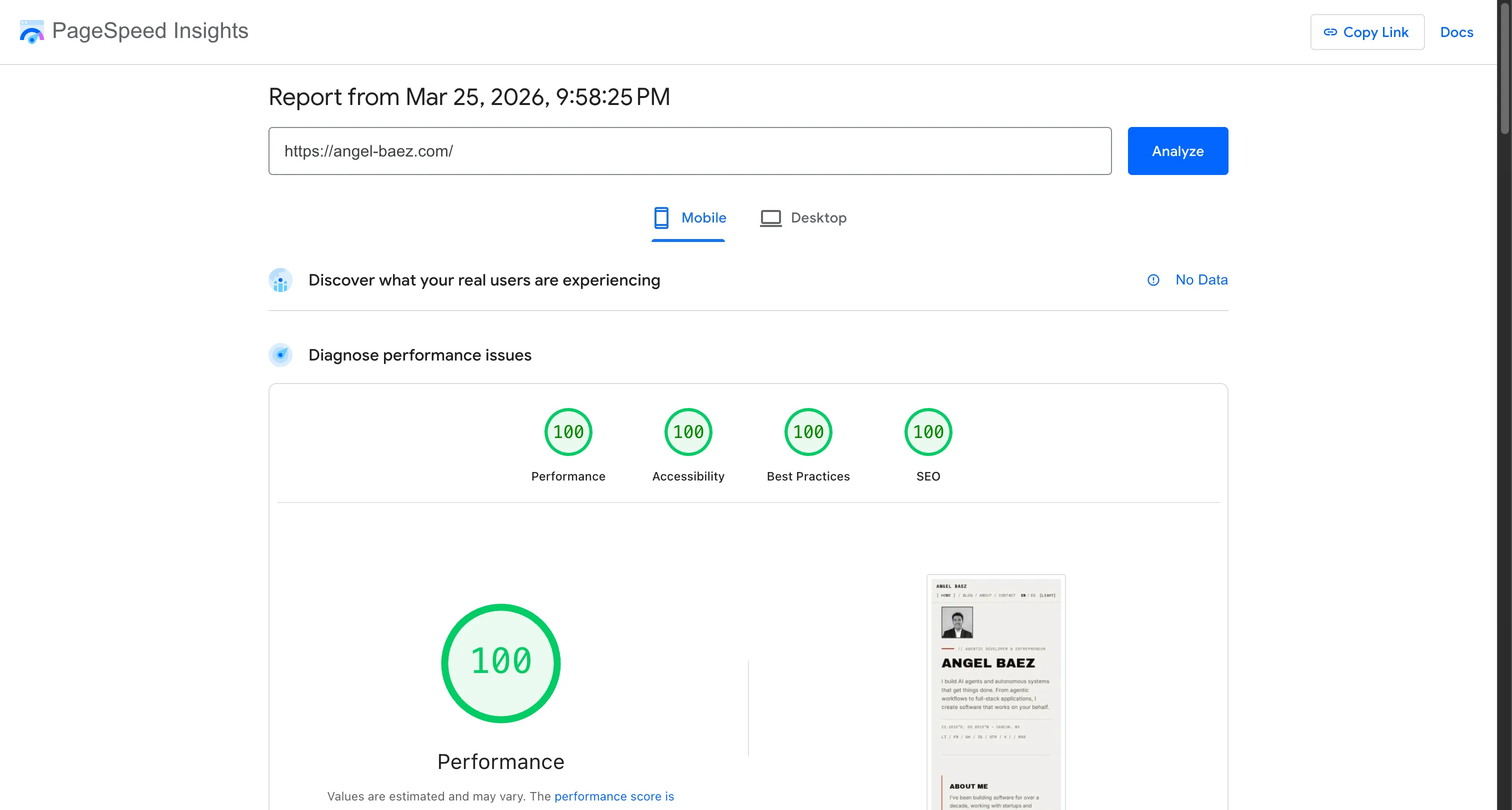
This site scores 100/100/100/100 on Google’s Lighthouse audit — Performance, Accessibility, Best Practices, and SEO. Not through tricks or micro-optimizations, but through architecture decisions that make perfect scores the natural outcome.
Here’s the full tech stack and why each piece matters.
The Stack
| Layer | Technology | Why |
|---|---|---|
| Framework | Astro 5 | Zero JS by default, static-first |
| Hosting | Cloudflare Pages | Edge-deployed, global CDN |
| Analytics | Cloudflare Zaraz | Zero client-side JavaScript |
| Styling | Vanilla CSS | No framework overhead |
| Fonts | Self-hosted via @fontsource | No external font requests |
| Images | Astro Image + Sharp | Build-time optimization (AVIF/WebP) |
| i18n | Custom Astro i18n | EN/ES with locale-aware routing |
| CI | GitHub Actions | Lighthouse CI + visual regression on every PR |
Why Core Web Vitals Are Great
Core Web Vitals aren’t just a Google ranking signal — they measure real user experience. Here’s what this site achieves:
LCP (Largest Contentful Paint): ~300ms The main content renders in under half a second. This happens because Astro inlines critical CSS directly into the HTML, fonts are self-hosted (no third-party DNS lookups), and the Cloudflare edge serves the page from the nearest data center.
CLS (Cumulative Layout Shift): 0.00
Zero layout shift. No fonts cause reflow because font-display: swap is handled at build time by @fontsource. Images have explicit dimensions. No dynamically injected content pushes things around.
INP (Interaction to Next Paint): Near-instant There’s almost no JavaScript on the page. The scramble animation on headings is the only JS, and it locks element dimensions before running to prevent layout shift. Everything else is CSS.
Astro: Ship Less, Score Higher
Astro’s architecture is the foundation. Unlike React-based frameworks that ship a JavaScript runtime to every page, Astro renders everything to static HTML at build time and ships zero JS by default.
What this means in practice:
- No hydration cost — The page is interactive as soon as HTML loads
- Inlined CSS — Each page gets only the styles it needs, inlined in
<head> - No client-side routing — View Transitions API handles page transitions natively
- Islands architecture — Interactive components only load JS when needed
The result is a page that loads, parses, and renders in a single pass. No framework boot time, no hydration flash, no JS-dependent content.
Cloudflare Pages + Zaraz: The Zero-JS Analytics Stack
Most analytics setups tank your performance score. Google Tag Manager alone is ~90 KB, and gtag.js adds another ~40 KB. That’s 130 KB of JavaScript just to count page views.
Cloudflare Zaraz eliminates this entirely:
- Analytics logic runs on Cloudflare’s edge, not in the browser
- The client-side payload is ~2-3 KB (a tiny loader)
- No
document.write, no blocking scripts, no deprecated API warnings - Free tier includes 1 million events/month
Previously, this site used Partytown to offload analytics to a web worker. But Partytown caused Best Practices failures — it enumerates all window properties during initialization, touching deprecated APIs like SharedStorage. Zaraz solved this with zero client-side code.
Self-Hosted Fonts: Eliminating Third-Party Requests
Google Fonts is convenient but adds latency: DNS lookup to fonts.googleapis.com, CSS fetch, then font file downloads from fonts.gstatic.com. That’s 3 round trips before your text renders.
Self-hosting via @fontsource bundles fonts into your build:
- Fonts are served from the same CDN as your HTML
- No CORS, no third-party DNS, no external CSS
font-display: swapis configured at build time- Only the weights you use are included
This site uses three fonts (Archivo Black, Inter, Space Mono) in specific weights — total font payload is ~60 KB, served from the edge.
Image Optimization: Build-Time, Not Runtime
Every image is processed at build time by Astro’s Image component + Sharp:
- Source images in
src/assets/(notpublic/) enable optimization - Automatic AVIF/WebP conversion with quality control
- Explicit
width/heightattributes prevent CLS loading="eager"on above-fold images,loading="lazy"everywhere elsefetchpriority="high"on the LCP image
The hero profile photo is 3 KB as an AVIF. Blog OG images are ~15 KB each.
Accessibility: 100 Without Compromise
Accessibility isn’t a separate concern — it’s embedded in every component:
- WCAG AA contrast ratios on all text. The accent color was adjusted three times during development until it passed on both dark and light backgrounds.
- Semantic HTML —
<nav>,<main>,<article>,<header>,<footer>everywhere. No<div>soup. - Aria attributes carefully applied — visible text matches accessible names (WCAG 2.5.3). Decorative elements have
aria-hidden="true". - Keyboard navigation works throughout. Focus states are visible.
prefers-reduced-motion— all animations (scramble text, entrance animations, view transitions) are disabled when the user prefers reduced motion.
SEO: Structured Data + Technical Hygiene
SEO scoring comes from technical correctness, not content tricks:
- Structured data —
WebSite,Person,BlogPosting,BreadcrumbList,FAQPage, andHowToschemas on appropriate pages - Hreflang — Proper
<link rel="alternate">for EN/ES withx-default - Canonical URLs — Every page has a canonical
- Meta descriptions — Unique per page
- Sitemap — Auto-generated by
@astrojs/sitemap - Open Graph + Twitter Cards — Generated OG images with unique generative patterns per post
CI: Preventing Regressions
Perfect scores mean nothing if they break on the next PR. Every pull request triggers:
- Lighthouse CI — Runs full audits, posts scores as a PR comment
- Visual regression tests — Playwright screenshots 32 snapshots (6 pages × 2 viewports × 2 themes), catches unintended visual changes
- Claude Code Review — Automated static analysis for accessibility, security, and code quality
If any check fails, the PR doesn’t merge. Scores are maintained by automation, not discipline.
The Result
| Category | Score |
|---|---|
| Performance | 100 |
| Accessibility | 100 |
| Best Practices | 100 |
| SEO | 100 |
LCP 300ms. CLS 0.00. Zero failed audits across every page.
The lesson: perfect Lighthouse scores aren’t about fixing issues after the fact. They’re about choosing a stack where performance, accessibility, and SEO are the default behavior, not afterthoughts.
FREQUENTLY ASKED QUESTIONS
What is a good Lighthouse score?
A score of 90+ is considered good, and 100 is perfect. Most production sites score between 60-90. Achieving 100 across all four categories (Performance, Accessibility, Best Practices, SEO) requires intentional architecture decisions, not just optimization after the fact.
Does Astro really make a performance difference?
Yes. Astro ships zero JavaScript by default — pages are static HTML with only the CSS needed for that page inlined. Compare that to Next.js or Gatsby which ship a React runtime (~40-80 KB) even for static pages. The difference shows in LCP and Time to Interactive.
Why Cloudflare Pages instead of Vercel or Netlify?
Cloudflare's edge network has the widest global coverage (300+ cities), and Pages has zero cold starts for static assets. Combined with Cloudflare Zaraz for analytics (zero client-side JS), you get a complete stack with minimal moving parts.
How do you maintain perfect scores as you add features?
CI automation. Every PR runs Lighthouse CI and visual regression tests automatically. If a change drops any score below threshold, the PR is flagged before it merges. Prevention is easier than remediation.